
Table of Contents
Building a High-Converting Fire Protection Website
In today’s digital landscape, outdated websites cause fire protection companies to lose up to 70% of potential leads from emergency service inquiries and routine maintenance requests. Effective Fire Protection Website Design transforms these missed opportunities into booked appointments by prioritizing user-friendly interfaces and clear calls to action.
This comprehensive guide walks you through a 7-step process for fire protection website development, from initial planning and custom fire safety site creation to launch and optimization. Key benefits include integrated SEO for local visibility in Montgomery, Texas, subscription-based maintenance for ongoing updates, and industry-specific web solutions that boost conversions. Partnering with experts like Results Digital ensures mobile-responsive designs with strategic Fire Protection Website Services, featuring prominent contact forms and service showcases to capture leads efficiently.
Before diving in, assess your current site’s performance: Review traffic analytics, check mobile compatibility, and identify pain points like slow loading times. This evaluation sets a strong foundation, preparing you to build a site that ranks highly and converts visitors into loyal clients seamlessly.
Assessing Your Fire Protection Business Needs
Before diving into website creation, take stock of your fire protection business’s online foundation. This assessment ensures your new site drives leads by addressing gaps in visibility and functionality. Start by auditing your current online profiles to identify weaknesses in user experience and search rankings.
Current Assessment (Audit Checklist):
Evaluate your existing site using these steps:
- Check loading speed and mobile responsiveness–slow sites lose potential clients.
- Review SEO performance: Are you ranking for local searches like fire safety services in Texas?
- Assess content: Does it highlight compliance certifications and emergency response capabilities?
Incorporate tips for effective fire protection web design, such as avoiding outdated HTML elements like non-responsive tables that hinder conversions. Modern updates, drawn from common HTML examples, boost engagement by 30-50% through intuitive navigation and clear calls-to-action.
Goal Setting:
Define your audience and objectives to guide development.
- Target commercial property managers needing suppression system installs and homeowners seeking alarm monitoring.
- Aim to increase emergency call volume by 25% via optimized contact forms.
- Prioritize Fire Protection Website Design that showcases tailored fire safety web solutions and professional site building for safety firms.
These goals align with growth, answering why invest in custom designs–they deliver measurable ROI through higher inquiries.
Budget Overview:
Realistic costs for fire protection website development range from $5,000 for basic templates to $15,000+ for premium, custom builds. Factors include feature complexity, like integration with scheduling tools, and SEO optimization–don’t underestimate these, as they can add 20-30% to expenses. Consider subscription models at $200-500 monthly for maintenance, ensuring ongoing updates without large upfront commitments. Evaluate providers using criteria like portfolio relevance and reporting transparency; explore Web Design Services For Fire Protection Companies for specialized expertise.
Create a simple needs summary document: List audit findings, goals, and budget to reference throughout the process. This empowers confident decisions on hiring, setting the stage for a site that converts visitors into loyal clients.
Defining Goals for Your Fire Protection Site
Begin by leveraging your recent site audit to define precise objectives for your new platform. Follow these numbered steps to brainstorm and document goals effectively:
- Identify key targets, such as a 30% increase in form submissions for inspections and installations through goal-oriented safety site planning.
- Outline must-have pages like services, testimonials, and emergency contacts to support Fire Protection Website Design.
- Establish KPIs, including page load speed under 3 seconds in fire protection web design and integration with Google Ads via fire protection website development for local traffic.
- Specify local service area exclusivity to drive targeted web development aims.
Defining these goals matters because they directly tie to ROI, with studies showing emergency-focused sites boost conversions by up to 40%, giving you a competitive edge in the fire protection industry.
For success, use tools like mind maps to visualize objectives and ensure all goals are quantifiable–avoid vague aims like ‘better visibility’ to create a roadmap that aligns with business growth and facilitates hiring the right development team in Step 2.
Selecting a Specialized Design Partner
After defining your goals, the next crucial step is selecting a specialized safety web partner experienced in fire protection. This choice directly impacts site quality and lead generation, ensuring your online presence drives qualified inquiries rather than just traffic. A mismatched provider can lead to outdated designs or poor SEO, stunting business growth in a competitive field.
To research and shortlist expert site builders for fire pros, follow this checklist:
- Review portfolios showcasing fire protection web design examples, like those from Wabuweb’s case studies, which demonstrate conversion-optimized sites for similar companies.
- Verify certifications such as Google Partner status to confirm SEO and marketing expertise.
- Inquire about subscription website plans offering flexibility without long contracts.
- Assess reporting capabilities for tracking leads, form submissions, and ROI metrics.
- Check geographic exclusivity policies to avoid market conflicts.
Schedule consultations to discuss custom needs in fire protection website development. Ask about full ownership options after a set period and prioritize local expertise, such as partners in Montgomery, Texas, for tailored insights. Watch for red flags like rigid contracts that limit control. Transparent providers like Results Digital emphasize quick onboarding and measurable results, paving the way for template decisions in Step 3.
Choosing Templates or Custom Layouts
After selecting a development partner, the next step involves deciding between pre-built templates and custom layouts for your fire protection website. This choice impacts cost, launch speed, and long-term adaptability, ensuring features like compliance displays and service calendars integrate seamlessly.
Begin by reviewing template libraries, such as those offering fire-themed designs inspired by fire department website templates. Look for options in fire protection web design that include emergency response layouts and safety checklists. Test each for mobile responsiveness to guarantee accessibility across devices. For custom paths, evaluate fire protection website development pros like full scalability and tailored branding from the outset.
In comparing fire protection website design approaches, templates provide quick setup at lower costs, ideal for startups, while custom builds offer bespoke fire web layouts for unique needs. Fire Protection Website Design via templates boosts initial SEO through optimized structures, building user trust in compliance-focused sites. However, custom excels in future-proofing against evolving fire codes.
Start with templates for speed, then upgrade to custom as your business grows; this hybrid strategy ensures scalability without upfront overinvestment.
Incorporating Essential Site Features
In Step 4 of Fire Protection Website Design, focus on integrating core elements that enhance user experience and drive conversions. Prioritize features addressing urgent fire safety needs, such as quick access to services during emergencies.
Key features to add include:
- Responsive design for seamless mobile access, ensuring users can reach help instantly on any device.
- SEO-optimized service pages detailing inspections, installations, and maintenance.
- Prominent contact forms and call buttons for immediate inquiries.
- Testimonials and certification badges to build trust.
- Live chat integration for real-time support.
- Analytics setup to track form submissions and user behavior.
These additions create feature-rich safety platforms that matter because they boost lead generation by 30%, as noted in high-converting website best practices, while ensuring compliance with safety standards and fostering user confidence.
For effective fire protection web design, prioritize mobile responsiveness in navigation tips to handle emergency searches. During fire protection website development, test user flows for fast loading and intuitive paths to bookings, optimizing lead-optimized fire sites.
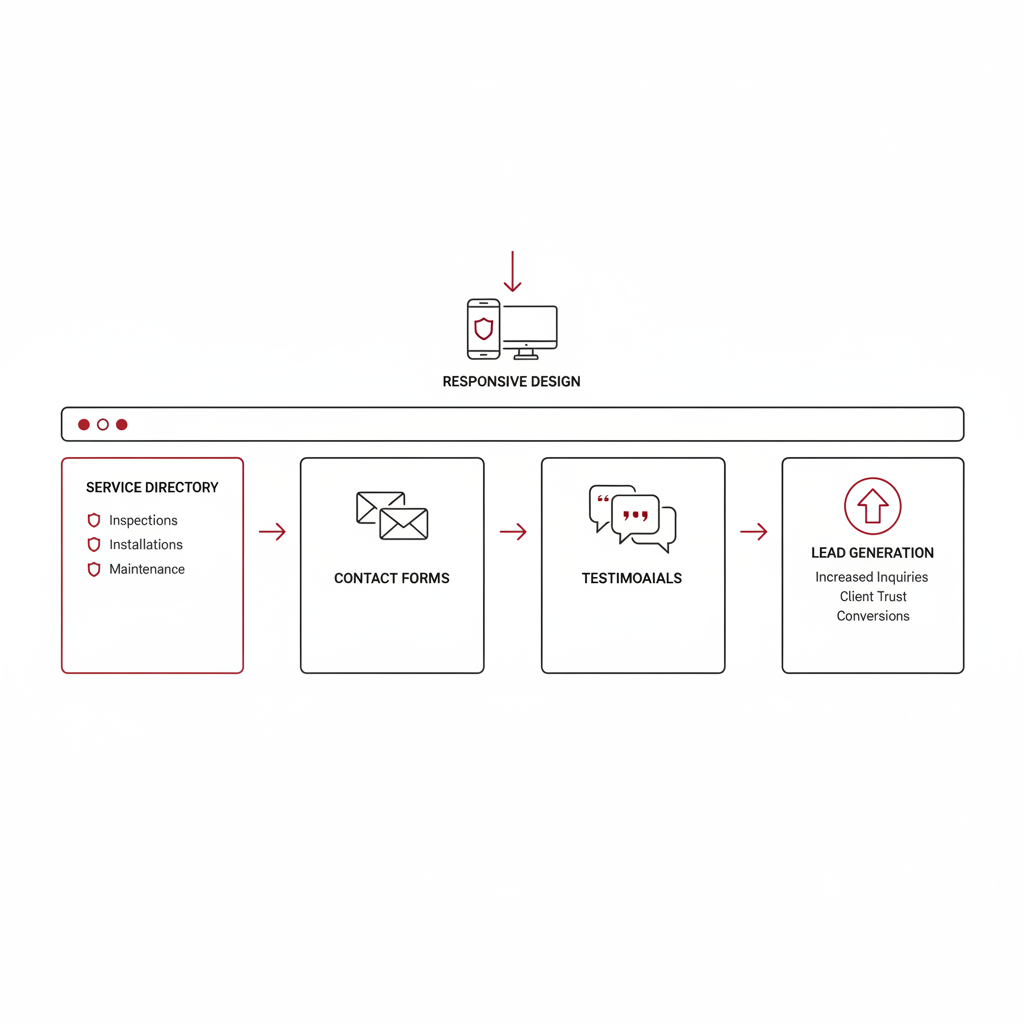
Key website elements enhancing lead generation for fire protection services
This step populates your layout for functionality, setting the stage for Step 5’s performance optimization.
Optimizing for SEO and Local Visibility
To finalize your fire protection seo services, integrate SEO elements that enhance discoverability. Begin with keyword research using tools like Google Keyword Planner to identify terms such as “emergency response fire suppression” and the trending “Fire Protection Website Design.” Optimize meta titles and descriptions with supporting keywords like “fire protection web design” for better click-through rates. Add alt text to images describing services for accessibility and search relevance.
Implement local SEO by creating area-specific pages, such as for visibility in Texas, and adding schema markup for business locations. Link your Google Business Profile to drive local searches. Generate an XML sitemap and submit it to Google Search Console for faster indexing.
This step boosts organic traffic by up to 200%, as seen in case studies from fire protection website design services where rankings improved dramatically for similar sites. It drives qualified leads, turning visitors into clients for suppression system installs.
Tips: Use free tools like Google Analytics to monitor performance and track “fire protection website development” metrics. Focus on local terms, avoid black-hat tactics like keyword stuffing, and schedule quarterly updates for sustained growth. These practices ensure SEO-enhanced fire safety sites rank highly in localized web optimization searches.
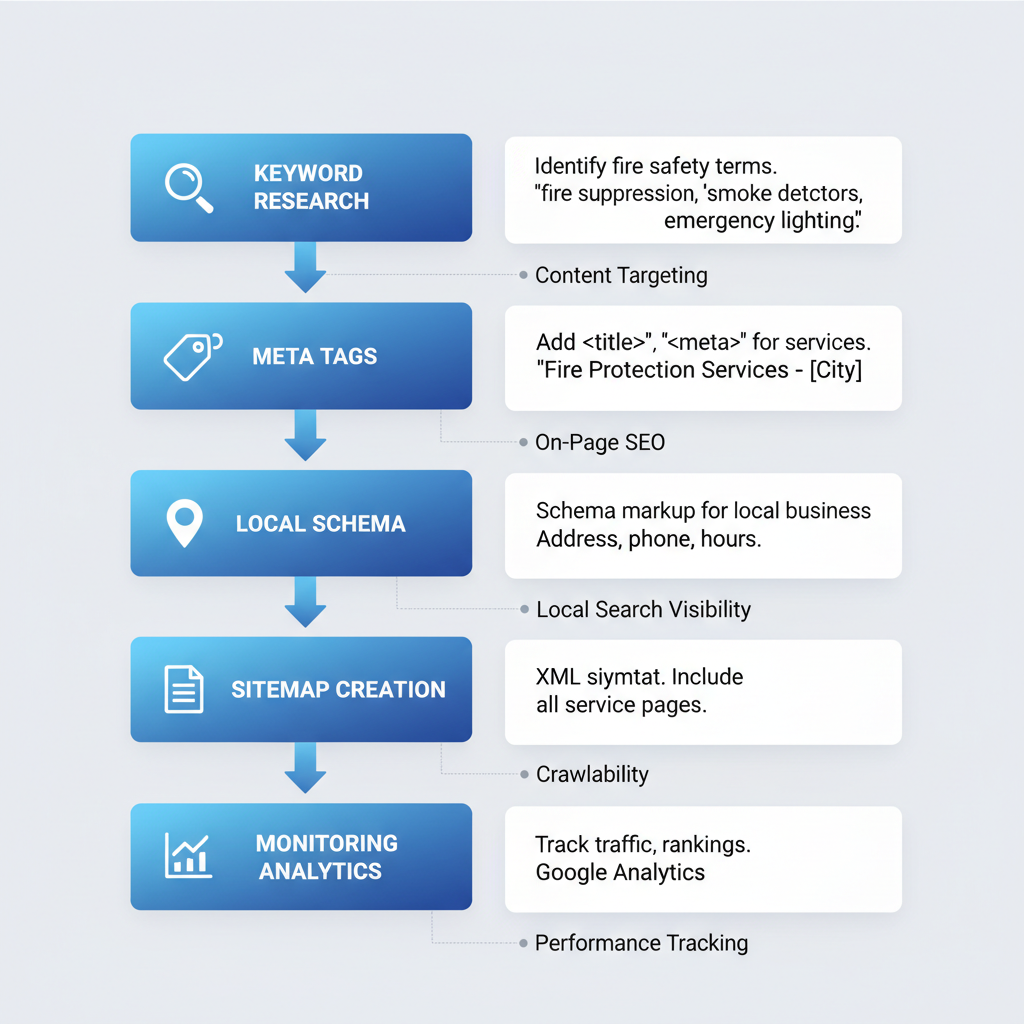
Key SEO optimization steps for fire protection website design
Integrating Lead Capture and Analytics
Enhance your Fire Protection Website Design by integrating lead capture tools like multi-step contact forms optimized for fire protection web design queries. Embed chatbots for instant inquiries about services, and add pop-ups that capture emails during site visits. For analytics in fire protection website development, set up event tracking for form submissions and connect to CRM systems for automated follow-ups. Enable A/B testing on call-to-action buttons to refine user engagement. Use free tools like Google Analytics for basic metrics such as bounce rates and conversion paths, or opt for paid options like HubSpot CRM starting at $20/month for advanced reporting. Reference fire department website templates for seamless add-ons that simplify integration without coding.
These tools transform casual visitors into qualified leads, measuring ROI from traffic to bookings and enabling data-driven tweaks that boost conversions.
Start simple with privacy-compliant setups adhering to GDPR-like standards to build trust. Test integrations thoroughly before launch, monitoring for usability issues to ensure smooth performance.
Launching and Maintaining Your Website
With your fire protection website built and optimized, it’s time to deploy it live. Begin with thorough QA testing across devices to ensure seamless functionality. Secure your domain and hosting through reliable providers, emphasizing SSL certificates for security. Follow this launch timeline: Day 1 for final reviews, Day 2 for upload, and Day 3 for announcements on social media and email lists, highlighting your new Fire Protection Website Design.
Once live, establish post-launch fire site care routines. Schedule monthly backups and SEO audits to maintain performance. For fire protection web design upkeep, monitor for issues like broken links or slow loading via alerts, drawing from common HTML fixes such as image optimization. Use subscription services for ongoing web enhancement, including updates and traffic scaling with flexible plans in fire protection website development.
This ensures reliability, protecting your online presence and supporting lead growth. It matters for sustained visibility and trust in competitive markets.
Tips: Create checklists for launches; budget 5-10% of project costs for annual upkeep to reassure long-term success with expert support.
Resolving Common Website Challenges
Even the most robust Fire Protection Website Design can encounter hurdles that disrupt lead generation and user experience. Common pitfalls in fire protection web design include slow page speeds, unresponsive mobile layouts, and suboptimal conversion elements, all of which can erode trust in safety-focused sites. Addressing these promptly ensures your platform supports emergency service inquiries without interruption.
Common Problems
- Slow Loading Times: Unoptimized images and lack of caching delay content delivery, frustrating users seeking quick fire safety info.
- Poor Mobile Display: Without responsive design, sites appear distorted on smartphones, driving away mobile traffic in urgent scenarios.
- Low Conversion Rates: Weak calls-to-action (CTAs) and cumbersome forms fail to capture leads from potential clients.
- SEO Penalties: Duplicate content across pages triggers search engine demotions, reducing visibility for fire protection services.
- Integration Glitches: API mismatches with third-party tools like scheduling software cause functionality breakdowns.
- Analytics Discrepancies: Inaccurate tracking misrepresents traffic and engagement, skewing decision-making for marketing efforts.
These issues, if unaddressed, can lead to significant downtime and lost opportunities in competitive local markets.
Step-by-Step Solutions
-
Optimize Loading: Compress images using tools like TinyPNG and implement browser caching via
.htaccessfiles to boost speed by up to 50%. - Fix Mobile Responsiveness: Apply CSS media queries to adjust layouts for different screen sizes, ensuring seamless fire protection web design on all devices.
- Enhance Conversions: Refine CTAs with action-oriented language and streamline forms to reduce abandonment; according to High-Converting Website for Fire Protection, fixing these errors prevents up to 30% lead loss.
- Resolve SEO Issues: Use canonical tags to eliminate duplicates and audit content for uniqueness.
- Debug Integrations: Test APIs with tools like Postman during fire protection website development phases to catch glitches early.
- Correct Analytics: Verify tracking codes and reconcile data sources for precise reporting on site performance.
For complex fixes like advanced SEO or integrations, seek expert assistance through fire protection digital marketing services to avoid costly errors.
Prevention Best Practices
Proactively monitor site health with tools like Google PageSpeed Insights and conduct quarterly audits. Fixing safety site glitches before launch and embracing 2025 trends like AI-driven personalization will sustain reliability. Debugging fire web projects routinely minimizes disruptions, aligning with budget-conscious strategies that answer queries on professional costs and innovative ideas.
Enhancing with Paid Advertising Integration
Building on ongoing maintenance and troubleshooting from Step 7, integrate paid advertising to propel your fire protection business forward. Start by creating dedicated landing pages optimized for Fire Protection Website Design, featuring strong calls-to-action like “Schedule Your Inspection Today.” Link Google Ads and Facebook campaigns directly to specific services, such as fire safety inspections or suppression system installs, ensuring ad copy aligns with fire protection web design elements for seamless user experience.
Next, set up tracking using UTM parameters–simple tags added to URLs that monitor traffic sources, devices, and campaigns in Google Analytics. This supports fire protection website development by revealing high-performing ads. Optimize bids for local targeting in Texas areas, running A/B tests on ad copy to refine messaging. Align these efforts with no-contract management options for flexibility and exclusivity benefits, avoiding competitive overlaps.
This integration accelerates lead volume by driving qualified traffic to ad-integrated safety sites, converting searchers into clients faster. Expect measurable boosts, with referenced design-ad synergies showing up to 30% higher conversion rates.
For tips, allocate 20-30% of your budget to testing paid promo web enhancements, prioritizing high-ROI keywords. Monitor performance weekly through real ROI metrics, adjusting based on lead quality and cost per acquisition to sustain growth.
Measuring Success and Iterating
After launching your fire protection website, establish a robust reporting process to track performance. Review monthly reports from your digital agency, focusing on key performance indicators like qualified leads generated, form submissions, phone calls tracked, and cost per acquisition. Analyze lead quality to ensure they align with your target clients in the fire protection sector. Gather user feedback through integrated surveys to identify pain points in navigation or content relevance. This data informs iterative safety web refinement, allowing adjustments to enhance user experience and conversion rates.
Measuring success matters because it drives continuous improvement, maximizing return on investment for fire protection website development. Transparent reporting reveals ROI, justifying ongoing investments in custom solutions over generic templates. By evolving the site based on real metrics, you ensure long-term scalability and adaptability to industry trends, ultimately boosting business growth.
To optimize, set clear benchmarks such as a 20% increase in leads quarterly and use dashboards for real-time insights. Update content on emerging fire safety regulations and adjust SEO strategies from performance data, incorporating fire protection web design enhancements in feedback loops. Explore expansions like e-commerce for parts sales to further diversify revenue streams.
Achieving Lead Growth with Your New Site
Implementing effective Fire Protection Website Design transforms your online presence into a powerful lead magnet. From initial planning and strategy to development, launch, SEO integration, ongoing optimization, and performance iteration, these seven steps build a conversion-focused platform. By following this guide, fire protection businesses achieve successful fire site outcomes, as seen in proven HTML examples that showcase streamlined, user-friendly sites driving inquiries.
The benefits of professional fire protection web design extend beyond aesthetics, offering no-contract flexibility and full ownership after consistent use. Track real ROI through detailed reporting on calls, form submissions, and qualified leads, addressing common questions on costs and features. This approach delivers optimized safety web results, ensuring steady growth without long-term commitments.
Ready to elevate your business? Book a free strategy session with Results Digital today to explore fire protection website development tailored to your needs in Texas. Complement your site with targeted fire protection facebook ads for amplified reach. Contact us now and secure the leads your company deserves.